Déplacements
OLEM possède 3 roues holonomes qui lui permettent de se déplacer dans toutes les directions et de combiner librement les mouvements en (x, y, thêta).
NB : OLEM fait de son mieux pour suivre vos instructions, mais s'il détecte le bord du plateau ou de la table, il fera en sorte de ne pas tomber.
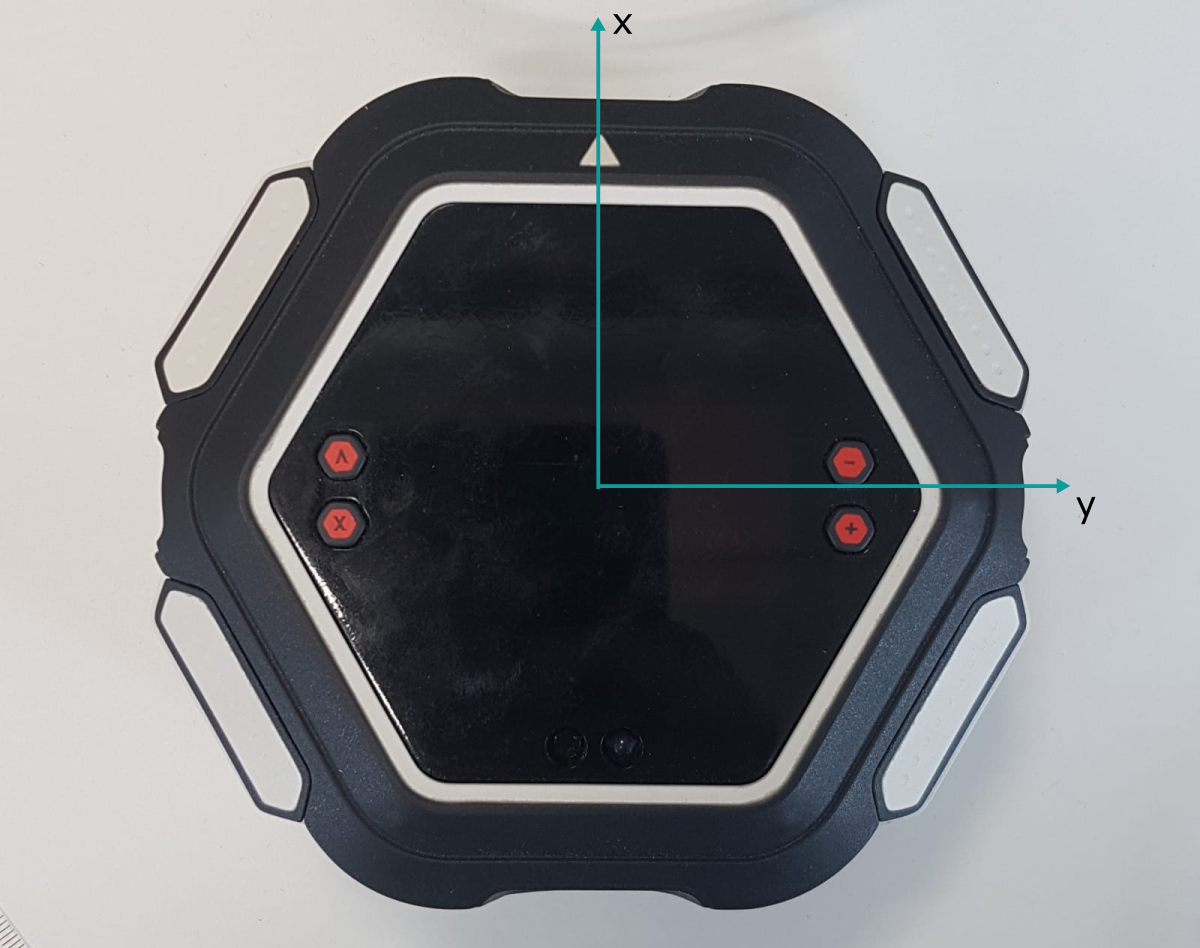
À l'exception de wait_stop_moving(), toutes les fonctions de déplacement sont non bloquantes.
Les déplacements peuvent être demandés dans l'espace cartésien ou dans l'espace polaire.
Les déplacements peuvent être demandés par rapport à la position actuelle ou à la position de départ.
Exemples
Contrôle de la vitesse
OLEM fait 10 allers-retours, de plus en plus vite.
import olem

for i in range(10):
    print(i)
    olem.set_move_speed((i + 1) / 10)
    olem.move(100, 0, 0)
    olem.wait_stop_moving()
    olem.move(-100, 0, 0)
    olem.wait_stop_moving()
Se déplacer en carré
OLEM parcourt deux fois le même carré, d'abord avec des déplacements relatifs (move()) puis avec des déplacements absolus (move_to()).
import olem

def square_path_relative(side_length, speed):
    """
    OLEM parcourt un carré de la largeur demandée, à la vitesse demandée,
    toujours orienté dans la même direction. La position actuelle d'OLEM
    est le coin en bas à gauche.
    :param side_length: largeur du carré en mm
    :param speed: entre 0 et 1.0
    """
    olem.set_move_speed(speed)
    olem.move(side_length, 0, 0)
    olem.wait_stop_moving()
    olem.move(0, side_length, 0)
    olem.wait_stop_moving()
    olem.move(-side_length, 0, 0)
    olem.wait_stop_moving()
    olem.move(0, -side_length, 0)
    olem.wait_stop_moving()

def square_path_absolute(side_length, speed):
    """
    OLEM parcourt un carré de la largeur demandée, à la vitesse demandée,
    toujours orienté dans la même direction.
    :param side_length: largeur du carré en mm
    :param speed: entre 0 et 1.0
    """
    olem.set_move_speed(speed)
    olem.move_to(side_length, 0, 0)
    olem.wait_stop_moving()
    olem.move_to(side_length, side_length, 0)
    olem.wait_stop_moving()
    olem.move_to(0, side_length, 0)
    olem.wait_stop_moving()
    olem.move_to(0, 0, 0)
    olem.wait_stop_moving()

square_width = 100
speed = 8 / 10

square_path_relative(square_width, speed)
square_path_absolute(square_width, speed)
Constantes et fonctions
Constants
| Constant | Value | Description |
|---|---|---|
MOVE_CORR_X_MASK | 1 | Correction along the x axis, based on the lines of the tiles. |
MOVE_CORR_Y_MASK | 2 | Correction along the y axis, based on the lines of the tiles. |
MOVE_CORR_DISTANCE_MASK | 4 | Correction of the travelled distance, based on the spacing between the lines of the tiles. Requires MOVE_CORR_X_MASK. |
MOVE_CORR_IWJ_MASK | 32 | |
MOVE_CORR_ISS_MASK | 64 | |
MOVE_CORR_MSAFE_MASK | 128 | Refuse movements that would make OLEM fall off the board or table. |
move(x, y, rotation)
Move OLEM by the requested amount in cartesian space, relative to its current position.
Returns immediately, use wait_stop_moving() to wait for the end of the movement.
| Parameter | Description |
|---|---|
x | translation along the x axis in mm |
y | translation along the y axis in mm |
rotation | rotation in degrees |
move_to(x, y, orientation)
Move OLEM to a position in cartesian space, relative to its position at startup or at the last reset_position().
Returns immediately, use wait_stop_moving() to wait for the end of the movement.
| Parameter | Description |
|---|---|
x | position along the x axis in mm |
y | position along the y axis in mm |
orientation | orientation in degrees |
wait_stop_moving()
Block until OLEM stops moving.
The wait ends if the game is stopped.
stop_moving()
Stop the current movement.
turn(rotation)
Turn OLEM on itself by the requested angle.
Returns immediately, use wait_stop_moving() to wait for the end of the rotation.
| Parameter | Description |
|---|---|
rotation | rotation in degrees |
turn_to(orientation)
Turn OLEM on itself to the requested orientation.
Returns immediately, use wait_stop_moving() to wait for the end of the rotation.
| Parameter | Description |
|---|---|
orientation | orientation in degrees |
move_polar(distance, direction, rotation)
Move OLEM by the requested amount in polar space, relative to its current position.
Returns immediately, use wait_stop_moving() to wait for the end of the movement.
| Parameter | Description |
|---|---|
distance | distance to travel in mm |
direction | direction of the movement in degrees |
rotation | rotation in degrees |
move_to_polar(distance, direction, orientation)
Move OLEM to a position given in polar space, relative to its position at startup or at the last reset_position().
Returns immediately, use wait_stop_moving() to wait for the end of the movement.
| Parameter | Description |
|---|---|
distance | distance from the origin in mm |
direction | direction from the origin in degrees |
orientation | orientation in degrees |
move_towards(direction)
Move OLEM in a direction until stop_moving() is called.
| Parameter | Description |
|---|---|
direction | direction in degrees, relative to OLEM's current orientation |
set_move_speed(speed)
Set the speed of the movements requested after this call.
The default speed is 1.0.
| Parameter | Description |
|---|---|
speed | fraction of the maximum speed, from 0.0 to 1.0 |
get_move_speed()
Returns: speed set with set_move_speed(), from 0.0 to 1.0
get_position_x()
Returns: position along the x axis in mm, relative to the position at startup or at the last reset_position()
get_position_y()
Returns: position along the y axis in mm, relative to the position at startup or at the last reset_position()
get_orientation()
Returns: orientation in degrees, from 0 to 359
get_orientation_absolute()
Unlike get_orientation(), the orientation is not brought back between 0 and 359: it keeps counting full turns and can be above 360 or negative.
Returns: orientation in degrees, as an integer
reset_position()
Stop the current movement and use the current position as the new origin: position (0, 0) and orientation 0.
is_moving()
Returns: True if OLEM is moving, False otherwise
center_on_rotate(angle)
Re-center OLEM on its tile: OLEM turns on itself and uses the lines of the tile seen by its floor sensors to correct its position.
Returns immediately. Has no effect if a centering is already running.
| Parameter | Description |
|---|---|
angle | rotation to perform in degrees, 90 is recommended |
move_correction_enable(mask)
Enable automatic corrections of the movements.
| Parameter | Description |
|---|---|
mask | corrections to enable, combine MOVE_CORR_* constants with | |
move_correction_disable(mask)
Disable automatic corrections of the movements.
| Parameter | Description |
|---|---|
mask | corrections to disable, combine MOVE_CORR_* constants with | |